
📅 Day 6 of 18 · COREP Governance Pipeline Series · Estimated reading time: 16 minutes
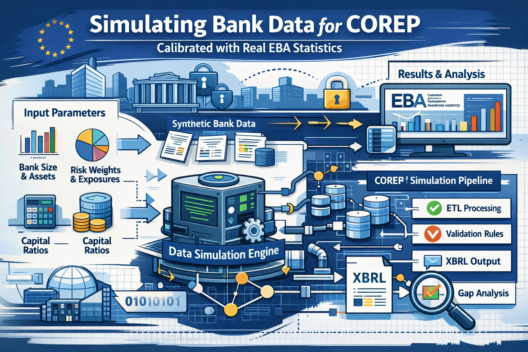
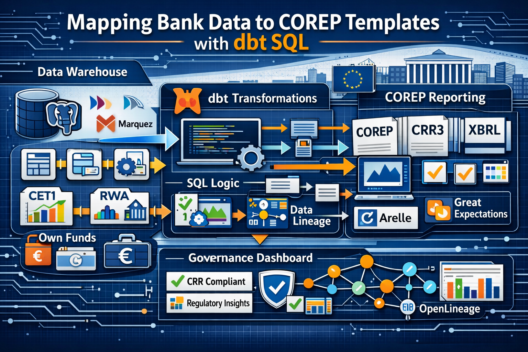
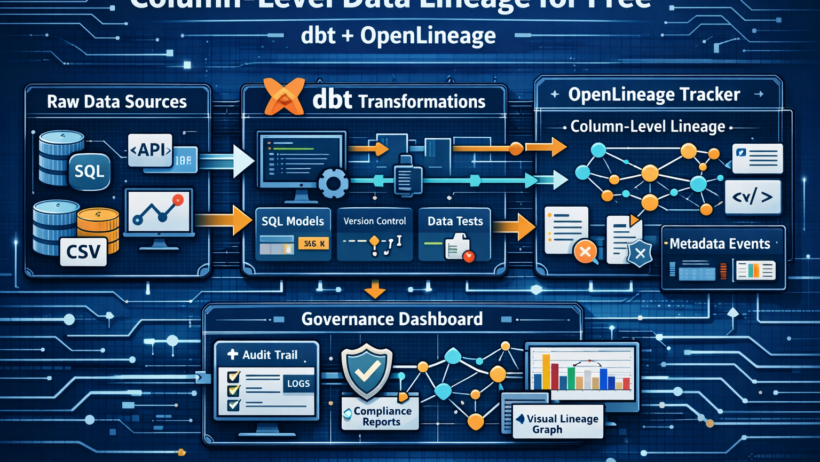
On Day 5 we loaded a calibrated synthetic bank into six raw PostgreSQL tables. Today those raw tables get transformed into the four COREP reporting templates — and something remarkable happens as a side effect: every column-to-column data lineage relationship in the entire pipeline is automatically recorded in Marquez without a single extra line of code.
That claim sounds too good to be true. This post proves it is not. By the end
you will understand exactly how dbt-openlineage hooks into the dbt
execution lifecycle, what the emitted lineage events look like, how they appear
in Marquez, and how OpenMetadata pulls them into the governance catalog so a
compliance auditor can trace any COREP figure back to its raw source column with
three mouse clicks.
What Column-Level Lineage Actually Means
Most people understand table-level lineage: “this table was produced from that table.” Tools like Apache Atlas, Amundsen, and basic dbt docs give you this easily. It looks like:
raw.capital_instruments  →  staging.stg_capital_instruments
                         →  intermediate.int_capital_by_tier
                         →  mart.corep_c0100
Column-level lineage goes one layer deeper. It tells you which specific column in the source produced which specific column in the output:
raw.capital_instruments.amount   →  stg_capital_instruments.amount
                                 →  int_capital_by_tier.total_amount
                                 →  corep_c0100.r010_cet1_capital
For regulatory reporting, column-level lineage is not a nice-to-have — it is a BCBS 239 requirement. Principle 3 (Accuracy and Integrity) requires that a bank can demonstrate data accuracy from source system to regulatory report. Principle 4 (Completeness) requires that no data is silently dropped or altered without a traceable reason. Column-level lineage is the machine-readable evidence of both principles.
The question is: how much engineering effort does it take to produce it? With dbt + dbt-openlineage, the answer is zero incremental effort after the one-time profile configuration.
How dbt-openlineage Works Under the Hood
dbt-openlineage is a dbt adapter extension that registers itself
as a dbt callback. When dbt compiles and executes a model, the extension
intercepts three events:
The magic is in the COMPLETE event. The extension parses the compiled SQL
(not the Jinja template — the actual SQL after macro expansion) and extracts the
column derivation graph using a SQL parser. It then packages that graph as a
ColumnLineageDatasetFacet — an OpenLineage standard facet — and
sends everything to Marquez in a single HTTP POST.
This means your SQL is the lineage documentation. You do not maintain lineage separately from the transformation logic. They are the same artifact.
The One-Time Configuration
Everything is configured in dbt/profiles.yml. This is the file
we set up on Day 1 and have not touched since:
corep_postgres:
  target: dev
  outputs:
    dev:
      type: postgres
      host:     "{{ env_var('POSTGRES_HOST', 'localhost') }}"
      port:     "{{ env_var('POSTGRES_PORT', '5432') | int }}"
      user:     "{{ env_var('POSTGRES_USER', 'corep_admin') }}"
      password: "{{ env_var('POSTGRES_PASSWORD', '') }}"
      dbname:   "{{ env_var('POSTGRES_DB', 'corep') }}"
      schema:   staging

      # ── OpenLineage transport — this is the entire lineage config ──
      openlineage:
        transport:
          type: http
          url:  "{{ env_var('MARQUEZ_URL', 'http://localhost:5000') }}"
        namespace: corep-governance-pipeline
Three lines of YAML under openlineage:. That is the entire
integration. Every dbt run from this point forward emits
column-level lineage to Marquez automatically.
The dbt Model Architecture: Three Layers
The transformation follows the standard dbt layering pattern, adapted for COREP:
Layer 1 — Staging Models in Detail
Five staging models clean the six raw tables. Let us walk through the two most instructive ones.
stg_capital_instruments.sql — Type Casting + Filter Validation
-- dbt/models/staging/stg_capital_instruments.sql
--
-- Casts raw string columns to correct types.
-- Filters: only valid Basel III tier values, non-null amounts.
-- OpenLineage will record: raw.capital_instruments.amount
--                       →  staging.stg_capital_instruments.amount
-- That column link becomes the first hop in the C 01.00 lineage chain.

with source as (

    select * from {{ source('raw', 'capital_instruments') }}

),

cleaned as (

    select
        instrument_id,
        isin,
        tier::varchar(4)                        as tier,
        amount::numeric(18, 2)                  as amount,
        currency::char(3)                       as currency,
        issue_date::date                        as issue_date

    from source

    where tier    in ('CET1', 'AT1', 'T2')
      and amount  is not null
      and amount  > 0

)

select * from cleaned
stg_counterparties.sql — GDPR Data Minimisation Enforced in SQL
-- dbt/models/staging/stg_counterparties.sql
--
-- IMPORTANT: 'name' and 'lei' columns are deliberately EXCLUDED.
-- This is the GDPR data minimisation control — enforced in SQL,
-- not in a policy document.
--
-- OpenLineage will NOT record a lineage link for 'name' or 'lei'
-- because they do not appear in this model's SELECT list.
-- That absence is itself an auditable governance fact.

with source as (

    select * from {{ source('raw', 'counterparties') }}

),

minimised as (

    select
        counterparty_id,
        country_code::char(2)                   as country_code,
        sector_code::varchar(10)                as sector_code,
        internal_rating::varchar(5)             as internal_rating

        -- 'name' and 'lei' intentionally omitted — GDPR Art. 5(1)(c)

    from source

)

select * from minimised
The lineage graph in Marquez will show a gap: raw.counterparties.name
and raw.counterparties.lei have no downstream lineage after the
staging layer. That gap is not a data quality problem — it is the data minimisation
control made visible. A compliance auditor can see in Marquez that PII columns
were consumed but not propagated.
Layer 2 — Intermediate Models: The COREP Calculations
int_capital_by_tier.sql
-- dbt/models/intermediate/int_capital_by_tier.sql
--
-- Aggregates individual capital instruments into tier totals.
-- This is the single source of truth for Own Funds in the mart layer.

with staged as (

    select * from {{ ref('stg_capital_instruments') }}

)

select
    tier,
    sum(amount)                                 as total_amount,
    count(*)                                    as instrument_count,
    min(issue_date)                             as earliest_issue_date,
    max(issue_date)                             as latest_issue_date

from staged
group by tier
int_lcr_hqla.sql — Haircut Application
-- dbt/models/intermediate/int_lcr_hqla.sql
--
-- Applies EBA LCR haircuts to raw market values.
-- CRR Article 416 / Delegated Regulation 2015/61:
--   Level 1:  0% haircut  → adjusted = market_value * 1.00
--   Level 2A: 15% haircut → adjusted = market_value * 0.85
--   Level 2B: 25-50%      → adjusted = market_value * (1 - haircut_rate)

with staged as (

    select * from {{ ref('stg_liquidity_assets') }}

)

select
    hqla_level,
    asset_id,
    market_value,
    haircut_rate,
    round(market_value * (1 - haircut_rate), 2)  as adjusted_value

from staged

where hqla_level in ('1', '2A', '2B')
  and market_value >= 0
Layer 3 — Mart Models: the Actual COREP Tables
The four mart models produce columns whose names and values map directly to
EBA DPM 4.0 data point IDs. When the XBRL generator runs on Day 11, it reads
the mart_to_xbrl_mapping.yaml file and maps each mart column to
its EBA concept identifier.
corep_c0100.sql — C 01.00 Own Funds
-- dbt/models/mart/corep_c0100.sql
--
-- EBA DPM 4.0 template C 01.00 — Own Funds
-- All amounts in EUR millions, rounded to 3 decimal places (decimals=-3 in XBRL)

with capital as (

    select * from {{ ref('int_capital_by_tier') }}

),

pivoted as (

    select
        -- r010: CET1 Capital  → EBA concept ei:c1r010c010
        sum(case when tier = 'CET1' then total_amount else 0 end)   as r010_cet1_capital,

        -- r020: AT1 Instruments → EBA concept ei:c1r020c010
        sum(case when tier = 'AT1'  then total_amount else 0 end)   as r020_at1_instruments,

        -- r030: Tier 1 Capital = CET1 + AT1 → ei:c1r030c010
        sum(case when tier in ('CET1', 'AT1') then total_amount
                 else 0 end)                                         as r030_tier1_capital,

        -- r040: T2 Instruments → ei:c1r040c010
        sum(case when tier = 'T2'   then total_amount else 0 end)   as r040_t2_instruments,

        -- r050: Total Own Funds = Tier1 + T2 → ei:c1r050c010
        sum(total_amount)                                            as r050_total_own_funds

    from capital

)

select
    round(r010_cet1_capital,    3)  as r010_cet1_capital,
    round(r020_at1_instruments, 3)  as r020_at1_instruments,
    round(r030_tier1_capital,   3)  as r030_tier1_capital,
    round(r040_t2_instruments,  3)  as r040_t2_instruments,
    round(r050_total_own_funds, 3)  as r050_total_own_funds

from pivoted
corep_c0300.sql — C 03.00 Capital Ratios
-- dbt/models/mart/corep_c0300.sql
--
-- EBA DPM 4.0 template C 03.00 — Capital Adequacy Ratios
-- NULLIF guards against divide-by-zero on zero-RWA edge cases.
-- Ratios stored as decimals (0.142 = 14.2%), 6 decimal places (decimals=4 in XBRL)

with capital as (

    select * from {{ ref('int_capital_by_tier') }}

),

rwa as (

    select * from {{ ref('int_rwa_by_exposure_class') }}

),

totals as (

    select
        sum(case when tier = 'CET1' then total_amount else 0 end)        as cet1,
        sum(case when tier in ('CET1','AT1') then total_amount else 0 end) as tier1,
        sum(total_amount)                                                  as total_own_funds
    from capital

),

rwa_total as (

    select sum(rwa) as total_rwa from rwa

)

select
    -- CET1 ratio: r010 → ei:c3r010c010
    round(t.cet1        / nullif(r.total_rwa, 0), 6)  as cet1_ratio,

    -- Tier 1 ratio: r020 → ei:c3r020c010
    round(t.tier1       / nullif(r.total_rwa, 0), 6)  as tier1_ratio,

    -- Total Capital ratio: r030 → ei:c3r030c010
    round(t.total_own_funds / nullif(r.total_rwa, 0), 6) as total_capital_ratio,

    -- Leverage ratio: r040 → ei:c3r040c010
    -- Simplified: Tier1 / Total Exposure Measure
    -- Full CRR2 Article 429 leverage exposure is out of scope for this project
    round(t.tier1 / nullif(r.total_rwa * 12.5, 0), 6) as leverage_ratio

from totals t
cross join rwa_total r
The Complete Model Dependency Graph
Run dbt docs generate && dbt docs serve to see this
visually. Here it is as text for reference:
dbt Tests: the Quality Layer Built Into the DAG
dbt tests run after every model execution. The tests on the mart layer enforce the Basel III ratio constraints — the same constraints we validated on the synthetic data in Day 5, now validated on the transformed output:
# dbt/models/schema.yml (mart layer tests — excerpt)

models:

  - name: corep_c0300
    description: "C 03.00 Capital Adequacy Ratios — EBA DPM 4.0"
    columns:
      - name: cet1_ratio
        tests:
          - not_null
          - dbt_utils.expression_is_true:
              expression: ">= 0.045"   # Basel III CET1 floor 4.5%

      - name: tier1_ratio
        tests:
          - dbt_utils.expression_is_true:
              expression: ">= 0.06"    # Basel III Tier 1 floor 6.0%

      - name: total_capital_ratio
        tests:
          - dbt_utils.expression_is_true:
              expression: ">= 0.08"    # Basel III Total Capital floor 8.0%

      - name: leverage_ratio
        tests:
          - dbt_utils.expression_is_true:
              expression: ">= 0.03"    # CRR2 Article 92(1)(d) floor 3.0%

  - name: corep_c4700
    columns:
      - name: lcr_ratio
        tests:
          - dbt_utils.expression_is_true:
              expression: ">= 1.0"     # CRD IV Article 412 LCR floor 100%
If any test fails, dbt test returns a non-zero exit code. The
transform.py module captures this and raises
QualityGateError, causing Airflow to branch to
notify_failure. The lineage for the failed run is still fully
recorded in Marquez with RunState.FAIL — so you can audit exactly
which model failed and with what data.
Running dbt and Watching Lineage Appear in Marquez
With the Docker stack running:
# Via the pipeline CLI — runs only the transform module
python pipeline.py --module transform

# Or run dbt directly from the dbt/ directory
cd dbt/
dbt run --profiles-dir .
dbt test --profiles-dir .
While dbt runs, open http://localhost:5000 (Marquez UI) in
another tab. Within seconds of each model completing you will see new jobs
appearing in the corep-governance-pipeline namespace. Each job
represents one dbt model. Click any job → click any run → click the lineage
tab. You will see the input and output datasets with the column-level lineage
graph.
The column-level graph for corep_c0300 looks like this in
Marquez’s JSON API (summarised):
{
  "facets": {
    "columnLineage": {
      "fields": {
        "cet1_ratio": {
          "inputFields": [
            {
              "namespace": "postgres://corep",
              "dataset":   "intermediate.int_capital_by_tier",
              "field":     "total_amount",
              "transformationType": "AGGREGATE",
              "transformationDescription": "SUM filtered by tier='CET1'"
            },
            {
              "namespace": "postgres://corep",
              "dataset":   "intermediate.int_rwa_by_exposure_class",
              "field":     "rwa",
              "transformationType": "AGGREGATE",
              "transformationDescription": "SUM used as denominator"
            }
          ]
        }
      }
    }
  }
}
That JSON is what OpenMetadata reads on Day 9 when it ingests lineage from
Marquez. It will render as a visual graph in the catalog showing the two
upstream columns that feed cet1_ratio, each with transformation
type labels.
What Lineage Looks Like End-to-End After dbt Run
The BCBS 239 Audit Scenario This Enables
Imagine a regulator asks: “How was your CET1 ratio of 14.2% in the Q4 2025 COREP submission calculated? Show us the source data and every transformation applied.”
Without column-level lineage, answering this requires a manual trace through documentation, Confluence pages, and email threads — a process that typically takes 2–5 days in a real bank.
With the lineage graph in Marquez (and later in OpenMetadata on Day 9), the answer is three clicks:
- Open OpenMetadata → search
corep_c0300→ clickcet1_ratio - Click Lineage tab — the three-hop graph above appears visually
- Click
raw.capital_instruments.amountat the root — the data contract, PII classification, and row count at the time of the run are all linked
That is BCBS 239 Principle 3 (Accuracy) and Principle 4 (Completeness) satisfied with a self-maintaining, code-driven evidence trail. Not a Word document. Not a Visio diagram that gets stale after the next sprint.
Common Issues and How to Diagnose Them
What “Free” Actually Costs
The claim “column-level lineage for free” deserves qualification. The
incremental effort after initial setup truly is zero — every
dbt run emits it automatically. But the one-time costs are real:
- SQL discipline: The lineage parser works on clean, explicit
SELECT lists.
SELECT *produces no column-level lineage. Every model in this project uses an explicit column list — which is good dbt practice anyway. - Source declarations: Every raw table must be declared in
schema.ymlundersources:. If a staging model queries a table directly by name instead of using{{ source() }}, the lineage chain breaks at that hop. - Marquez running: The lineage backend must be up when
dbt runs. That is why Marquez is in
docker-compose.ymland starts on Day 1 — not Day 9 when the catalog is configured.
These are not burdens — they are the same disciplines that make dbt projects maintainable regardless of lineage. Column-level lineage is a free by-product of writing good dbt SQL.
What Comes Next: Great Expectations Quality Gates
The mart tables now exist and contain COREP-compliant ratios. Day 8 builds the Great Expectations quality gate that runs between the dbt transform and the catalog ingestion step. The gate validates not just the mart outputs but the intermediate tables — catching a bad LCR haircut calculation before it reaches the XBRL generator. We will also see how a failing expectation suite writes its HTML data docs to MinIO so the audit trail is preserved even when the pipeline fails.
Key Takeaways
- Column-level lineage is a BCBS 239 requirement — not a nice-to-have —
and dbt-openlineage satisfies it as a zero-cost side effect of
dbt run - The three-layer dbt architecture (staging → intermediate → mart) maps directly to the COREP data flow: raw source → regulatory calculation → reportable template row
- Staging models that use
{{ source() }}instead of raw table names are the key to a complete lineage chain from EBA DPM column back to the source system field - GDPR data minimisation enforced in SQL (dropping
nameandleiinstg_counterparties) is visible as a lineage gap in Marquez — absence of downstream lineage is itself an auditable fact - dbt tests on Basel III ratio floors run automatically after every model
execution — a failed test raises
QualityGateErrorand Airflow branches tonotify_failure SELECT *in dbt models kills column-level lineage — always use explicit column lists- Marquez must be running from Day 1, not from the day you configure the catalog — you cannot retroactively emit lineage for past runs
Series navigation:
←
Day 5: Simulating a Bank’s Data for COREP — Calibrated with Real EBA Data
|
Day 8: Great Expectations Quality Gates — Catch Bad Capital Ratios Before the Regulator Does →